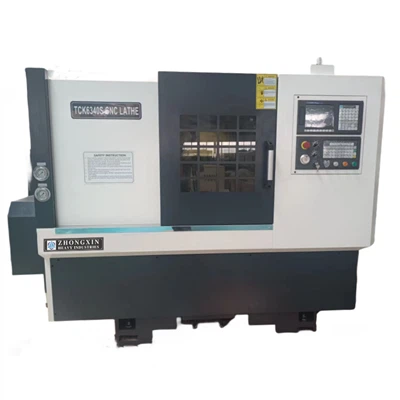
Programming a Swiss Turn Lathe can seem like a daunting task, especially if you're new to the world of machining. But don't worry! As a Swiss Turn Lathe supplier, I've helped many customers get the hang of it. In this blog, I'll walk you through the process step by step, so you can start making high - precision parts in no time.
Understanding the Basics of a Swiss Turn Lathe
First things first, let's talk about what a Swiss Turn Lathe is. A Swiss Turn Lathe is a specialized type of lathe that's designed to produce small, high - precision parts. It uses a sliding headstock and guide bushing to support the workpiece, which allows for very accurate machining. The workpiece is fed through the guide bushing, and the cutting tools are held in a turret or a gang tool post. This setup enables the lathe to perform multiple operations simultaneously, such as turning, drilling, and milling.
Getting Familiar with the Control System
The heart of programming a Swiss Turn Lathe is the control system. Most modern Swiss Turn Lathes come with a CNC (Computer Numerical Control) system. This system allows you to input a series of commands that tell the lathe what operations to perform and how to perform them.
When you first start working with the control system, take some time to explore the interface. Familiarize yourself with the different buttons, menus, and functions. Many control systems have built - in tutorials and help guides that can be really useful. For example, you can learn how to set up a new program, edit an existing one, or run a test cycle.
Creating a Part Program
Now, let's get into the nitty - gritty of creating a part program. The first step is to define the part geometry. You need to know the dimensions of the part you're going to machine, including the diameter, length, and any features like holes or threads.
Once you have the part geometry, you can start writing the program. The program is written in a programming language called G - code. G - code is a standard language used in CNC machining to control the movement of the machine tools.


Here's a simple example of G - code for turning a cylindrical part:
N10 G20 (Set units to inches)
N20 G90 (Set absolute positioning)
N30 T0101 (Select tool 1 and set tool offset)
N40 M03 S1000 (Start the spindle in clockwise direction at 1000 RPM)
N50 G00 X1.0 Z0.1 (Rapid move to starting position)
N60 G01 X0.5 F0.01 (Feed move to reduce diameter to 0.5 inches at a feed rate of 0.01 inches per revolution)
N70 G00 X1.0 Z0.1 (Rapid move back to starting position)
N80 M05 (Stop the spindle)
N90 M30 (End the program)
In this example, each line starts with an "N" followed by a number, which is the line number. The commands are things like setting the units, starting the spindle, and moving the tool.
Tool Selection and Setup
Selecting the right tools is crucial for successful machining on a Swiss Turn Lathe. You need to choose tools that are appropriate for the material you're machining and the operations you're going to perform.
For turning operations, you'll typically use carbide inserts. These inserts are available in different shapes and sizes, depending on the type of cut you need to make. For drilling and milling, you'll use drill bits and end mills.
Once you've selected the tools, you need to set them up on the lathe. This involves mounting the tools in the turret or gang tool post and setting the tool offsets. Tool offsets are used to compensate for the differences in the physical size of the tools. You can measure the tool offsets using a tool presetter or by using the touch - off feature on the lathe.
Setting up the Workpiece
Before you start machining, you need to set up the workpiece on the lathe. This involves loading the bar stock into the spindle and clamping it securely. Make sure the bar stock is centered and aligned properly.
You also need to set the work coordinate system. The work coordinate system defines the origin of the part program. You can set the work coordinate system using the control system. Usually, you'll set the origin at the end of the bar stock or at a specific feature on the part.
Running the Program
Once you've created the part program, selected and set up the tools, and set up the workpiece, you're ready to run the program. But before you start full - scale machining, it's a good idea to run a dry run. A dry run is a test cycle where the lathe moves through the program without actually cutting the material. This allows you to check for any errors in the program and make sure the tool paths are correct.
If the dry run goes well, you can start machining the part. Keep an eye on the lathe as it's running. Watch for any signs of problems, such as excessive vibration, strange noises, or incorrect tool movements. If you notice any issues, stop the lathe immediately and make the necessary adjustments.
Troubleshooting Common Problems
Even if you've followed all the steps correctly, you might still run into some problems when programming and running a Swiss Turn Lathe. Here are some common problems and how to troubleshoot them:
Tool Breakage: Tool breakage can be caused by a variety of factors, such as incorrect tool selection, improper cutting parameters, or worn - out tools. If a tool breaks, stop the lathe and replace the tool. Check the cutting parameters and make sure they're appropriate for the material and the tool.
Poor Surface Finish: A poor surface finish can be due to issues like incorrect feed rate, spindle speed, or tool wear. Try adjusting the feed rate and spindle speed to see if it improves the surface finish. If the tool is worn, replace it.
Part Dimensional Errors: Dimensional errors can occur if the work coordinate system is set up incorrectly, the tool offsets are wrong, or there's a problem with the program. Check the work coordinate system and tool offsets, and review the part program for any errors.
Advantages of Using a Swiss Turn Lathe
Swiss Turn Lathes offer several advantages over traditional lathes. They're capable of producing very small and complex parts with high precision. The sliding headstock and guide bushing design allows for better control over the workpiece, which results in less vibration and better surface finish.
Also, Swiss Turn Lathes can perform multiple operations in a single setup, which reduces the machining time and increases productivity. For example, you can turn, drill, and mill a part all in one go, without having to move the part to different machines.
Related Products
If you're interested in other types of lathes, we also offer Horizontal CNC Lathe Machine, New CNC Lathe, and Heavy Duty Metal Lathe. These lathes are suitable for different applications and can complement your machining capabilities.
Conclusion
Programming a Swiss Turn Lathe might seem complicated at first, but with a little practice and patience, you can master it. Remember to understand the basics of the lathe, get familiar with the control system, create accurate part programs, select and set up the tools properly, and troubleshoot any problems that come up.
If you're interested in purchasing a Swiss Turn Lathe or have any questions about programming or operating one, feel free to reach out. We'd be happy to help you with your machining needs and guide you through the process of getting the most out of your lathe.
References
- "CNC Programming Handbook" by Mark Reha
- "Machining Fundamentals" by John R. Walker
- Manufacturer's manuals for Swiss Turn Lathes