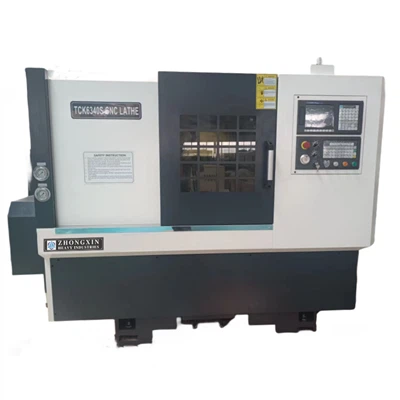
As a supplier of the Ck6150 CNC Lathe, I understand the importance of setting up the zero point correctly on this machine. The zero point, also known as the reference point, is crucial for accurate machining operations. In this blog post, I will guide you through the process of setting up the zero point on the Ck6150 CNC Lathe.
Understanding the Zero Point in CNC Lathes
Before diving into the setup process, it's essential to understand what the zero point means in the context of a CNC lathe. The zero point serves as a fixed reference from which all other positions on the machine are measured. It allows the CNC system to precisely control the movement of the cutting tool relative to the workpiece. There are two main types of zero points: the machine zero point and the workpiece zero point.
The machine zero point is a fixed position on the lathe that is set by the manufacturer. It is usually located at the extreme end of the machine's travel in each axis. The workpiece zero point, on the other hand, is a user-defined point on the workpiece. It is the starting point for all machining operations on that particular workpiece.
Prerequisites for Setting Up the Zero Point
Before you start setting up the zero point on the Ck6150 CNC Lathe, there are a few things you need to do:
- Inspect the Machine: Ensure that the lathe is in good working condition. Check for any loose parts, damaged cables, or signs of wear and tear.
- Prepare the Workpiece: Clean the workpiece thoroughly to remove any dirt, debris, or oil. Make sure it is securely clamped in the chuck or fixture.
- Select the Cutting Tool: Choose the appropriate cutting tool for the machining operation. Install the tool in the tool post and adjust it to the correct height.
- Power On the Machine: Turn on the power supply to the lathe and allow it to warm up for a few minutes.
Setting Up the Machine Zero Point
The machine zero point is set during the initial installation and calibration of the lathe. However, it may need to be rechecked or reset from time to time. Here's how you can set up the machine zero point on the Ck6150 CNC Lathe:
- Move the Axes to the Home Position: Use the control panel to move the X and Z axes to their home positions. The home position is usually indicated by a limit switch or a proximity sensor.
- Set the Machine Zero Point: Once the axes are in the home position, use the control panel to set the machine zero point. This is usually done by entering a specific command or pressing a dedicated button.
- Verify the Machine Zero Point: After setting the machine zero point, verify it by moving the axes to different positions and checking the position display on the control panel. The position values should match the expected values based on the machine's specifications.
Setting Up the Workpiece Zero Point
The workpiece zero point is set for each individual workpiece. It allows the CNC system to accurately position the cutting tool relative to the workpiece. Here's how you can set up the workpiece zero point on the Ck6150 CNC Lathe:


- Select the Workpiece Coordinate System: Use the control panel to select the appropriate workpiece coordinate system. This is usually done by entering a specific command or pressing a dedicated button.
- Position the Cutting Tool: Use the control panel to move the cutting tool to a known position on the workpiece. This can be the end face, the outer diameter, or any other reference point on the workpiece.
- Set the Workpiece Zero Point: Once the cutting tool is in the desired position, use the control panel to set the workpiece zero point. This is usually done by entering a specific command or pressing a dedicated button.
- Verify the Workpiece Zero Point: After setting the workpiece zero point, verify it by moving the cutting tool to different positions on the workpiece and checking the position display on the control panel. The position values should match the expected values based on the workpiece's dimensions.
Tips for Setting Up the Zero Point
Here are some tips to help you set up the zero point on the Ck6150 CNC Lathe more accurately and efficiently:
- Use Precision Measuring Tools: Use precision measuring tools such as micrometers, calipers, and dial indicators to ensure accurate positioning of the cutting tool and the workpiece.
- Follow the Manufacturer's Instructions: Always follow the manufacturer's instructions when setting up the zero point on the lathe. This will ensure that the machine is set up correctly and safely.
- Take Your Time: Setting up the zero point is a critical step in the machining process. Take your time to ensure that the zero point is set up accurately. Rushing through this step can lead to errors and poor-quality machining.
- Keep Records: Keep records of the zero point settings for each workpiece. This will help you reproduce the same settings in the future and ensure consistent machining results.
Conclusion
Setting up the zero point on the Ck6150 CNC Lathe is a crucial step in the machining process. It allows the CNC system to accurately position the cutting tool relative to the workpiece, resulting in precise and high-quality machining. By following the steps outlined in this blog post and using the tips provided, you can set up the zero point on the Ck6150 CNC Lathe with confidence.
If you are interested in purchasing a Ck6150 CNC Lathe or need further assistance with setting up the zero point or any other aspect of the machine, please feel free to contact us for a detailed discussion and procurement negotiation. We are committed to providing you with the best products and services.
References
- "CNC Lathe Operation Manual"
- "Precision Machining Handbook"
For more information about our other lathe products, you can visit the following links:
Swiss Turn Lathe
Precision CNC Lathe
Ck6150 CNC Lathe