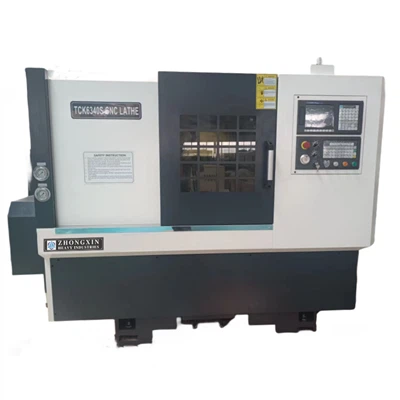
As a dedicated supplier of Fanuc Lathes, I understand the importance of providing in - depth guidance on operating essential accessories, such as the bar feeder. In this blog post, I'll share a comprehensive guide on how to operate the bar feeder on a Fanuc Lathe, ensuring smooth and efficient machining processes.


Preparation before Operation
Before powering on the bar feeder and the Fanuc Lathe, a series of preparatory steps must be taken. First, check the bar feeder body for any visible damage, such as cracks or loose parts. This inspection will prevent unexpected malfunctions during operation. Next, verify the lubrication levels of all the moving components of the bar feeder. Proper lubrication not only extends the service life of the equipment but also ensures its smooth operation.
The bar stock selection is also crucial. Ensure that the diameter and length of the bar stock match the specifications of the bar feeder. Incorrectly sized bar stock can lead to feeding problems or even damage the bar feeder mechanisms. Place the bar stock carefully into the bar feeder magazine, making sure it is aligned properly and not tilted.
Power - On and Initial Setup
Once the preparation is complete, power on the bar feeder and the Fanuc Lathe. Allow both machines to complete their self - checks. On the control panel of the bar feeder, you'll need to set some initial parameters. The first parameter to set is the bar stock length. Input the exact measurement of the bar stock you loaded into the magazine. This data is essential for the bar feeder to know how much material to feed each time.
Next, set the feed speed. The feed speed should be adjusted according to the type of material, the diameter of the bar stock, and the machining requirements. For softer materials, a relatively higher feed speed can be used; for harder materials, a slower feed speed is often necessary to ensure accurate machining and prevent tool wear. On the Fanuc Lathe control panel, also configure the related parameters to match the bar feeder settings, such as the co - ordinate system and the initial position of the tool.
Calibration and Testing
After setting the initial parameters, calibration is required to ensure the alignment between the bar feeder and the Fanuc Lathe. Use the calibration tools provided with the bar feeder to check and adjust the alignment of the bar stock feeding path. Make sure the bar stock can be fed precisely into the chuck of the lathe.
To test the calibration and the initial settings, perform a dry run. Start the bar feeder in a test mode without the cutting tool engaged. Observe the feeding process carefully. Check if the bar stock is fed smoothly, without any jams or misalignments. If any issues are detected during the dry run, stop the machine immediately and make the necessary adjustments.
Normal Operation
Once the dry run is successful, you can start the normal machining process. On the Fanuc Lathe control panel, select the appropriate machining program. The program should be designed to work in conjunction with the bar feeder's feeding cycle. As the lathe starts the machining operation, the bar feeder will feed the bar stock forward at a controlled rate.
During the machining process, closely monitor both the bar feeder and the lathe. Check the bar stock feeding status regularly to ensure that it is being fed accurately and continuously. Also, observe the cutting performance on the lathe, such as the chip formation and the surface finish of the workpiece. Any abnormal conditions, such as excessive vibrations or strange noises, should be addressed promptly.
Maintenance and Troubleshooting
Regular maintenance is key to keeping the bar feeder and the Fanuc Lathe in optimal condition. Clean the bar feeder regularly to remove chips and debris that may accumulate during the machining process. Check and replace the lubricant at the recommended intervals. Inspect the wear - prone parts, such as the guide tubes and the feeding pawls, and replace them when necessary.
If there are issues with the bar feeder, such as a feeding jam, first, stop the machining operation immediately. Try to identify the cause of the jam. It could be due to misaligned bar stock, a damaged feeding mechanism, or debris blocking the path. Once the cause is determined, take appropriate measures to resolve the problem. In case of more complex problems, don't hesitate to contact the manufacturer's technical support.
Applications of Fanuc Lathes with Bar Feeders
The combination of a Fanuc Lathe and a bar feeder is widely used in various industries. For example, in the automotive industry, it can be used to produce high - precision engine parts. The Dual Spindle CNC Lathe equipped with a bar feeder can significantly improve the production efficiency by allowing simultaneous machining on two spindles.
In the aerospace industry, where high - quality and precise components are required, the Horizontal CNC Lathe Machine with a bar feeder can handle the machining of complex parts with high accuracy. Also, the Ck6150 CNC Lathe combined with a bar feeder is a popular choice in the general machinery manufacturing sector for its versatility and reliability.
Conclusion and Call to Action
Operating the bar feeder on a Fanuc Lathe requires careful preparation, accurate parameter setting, and regular maintenance. By following the steps outlined in this blog post, you can ensure the smooth and efficient operation of your machining setup.
Whether you are new to using a bar feeder on a Fanuc Lathe or looking to upgrade your current equipment, we are here to assist you. Our team of experts is ready to provide you with professional advice and support. If you are interested in learning more about our Fanuc Lathes and bar feeders or would like to discuss a potential purchase, please reach out to us. We are eager to engage in a detailed procurement discussion with you to meet your specific machining needs.
References
- Fanuc Lathe Operator's Manual
- Bar Feeder Manufacturer's Technical Documentation
- Industry Standards for CNC Machining with Bar Feeders